3D Anatomy
- 4.3
- Rating
- 100.00K
- Installs
- $2.99
- Price
 Analysis by App-foxy
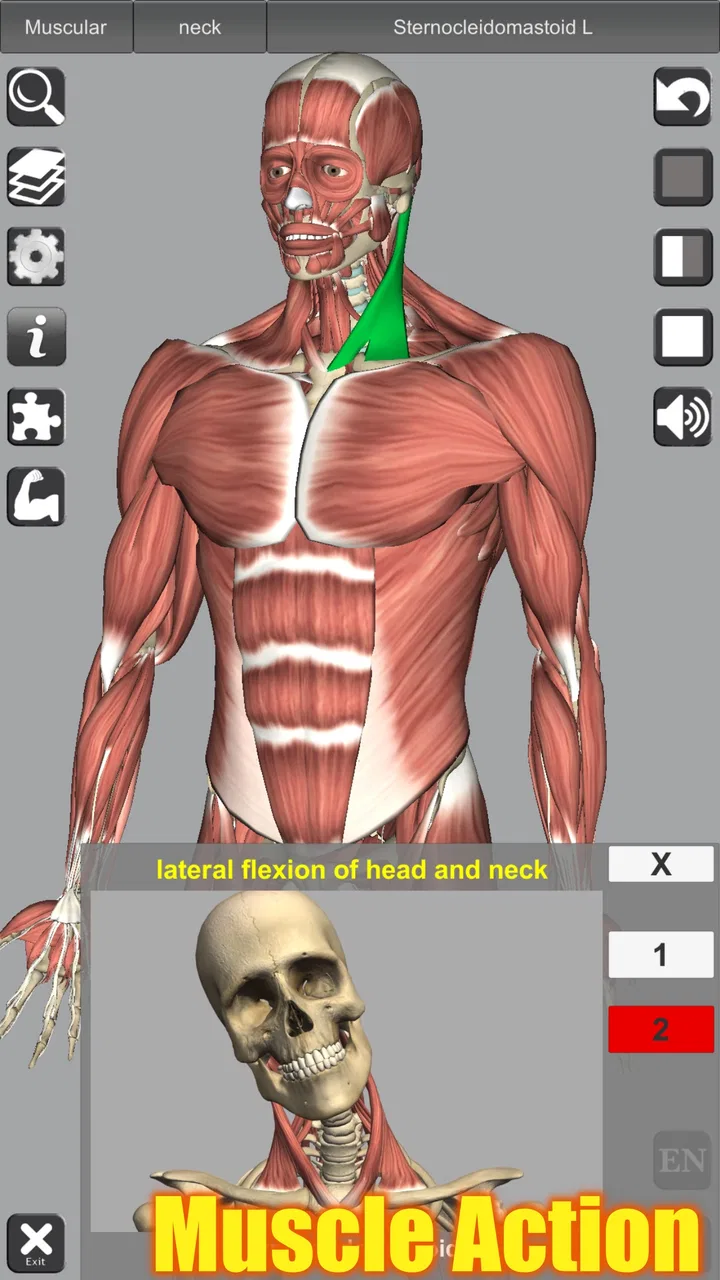
Learning anatomy from a flat picture can feel like trying to understand a building from one wall. 3D Anatomy takes a more useful approach by letting me study the human body as a three-dimensional model, with particular attention to how muscles act. I found that difference important from the first few minutes: instead of memorizing isolated labels, I could turn the body around and think about where a structure sits in relation to the others.
This is a paid medical education app from Education Mobile, aimed at anyone who wants a visual way to explore human anatomy. It costs $2.99, carries an Everyone age rating, and runs on Android devices using at least version 5.1. Its current version is 7.0, and the app has built a solid audience, with a 4.3 average from around 3K ratings and over 100K installs. Those figures do not replace personal testing, but they do suggest that it has remained useful to a broad group of learners.
What the first session feels like
The main appeal is not simply that the model looks three-dimensional. The useful part is being able to inspect anatomy spatially. When I study a muscle on a conventional diagram, I often understand its name but lose track of its depth, neighboring structures, or direction. A rotatable model makes those relationships easier to revisit, especially when I approach the same area from the front, side, and back.
You May Also Like

 Blood Strike: 2.5 Anniversary
Blood Strike’s Loadouts Turn Every Drop Into a Tactical Gamble
A close look at Blood Strike’s custom loadouts: how fast access to signature weapons reshapes its battle royale rhythm, rewards preparation, and narrows the gap between fights.

 Pandora - Music & Podcasts
Pandora’s Music Is Easy to Start, but Harder to Recover
Pandora’s strength is its low-effort path from a seed to a station. Its weak spot is how much confidence it asks you to place in connection, setup, and quiet recovery.

 8 Ball Pool
 Is Built on Rivalries, Rematches, and Routine
A close look at the rivalries, rematches, shared routines, and unanswered safety questions that turn a quick pool match into a persistent mobile community.

 Samsung Music
’s Quiet Strength Is Playing What You Already Own
Its reach comes less from spectacle than from dependable access to a personal library. That simplicity is both the app’s strongest retention engine and its ceiling.

 AccuWeather: Weather Radar
AccuWeather Review: A Quick, Clear Forecast for Everyday Decisions
For everyday plans, the best forecast is the one you can understand quickly. AccuWeather makes rain timing, radar, and local conditions easy to act on, with a few trade-offs.

 Hill Climb Racing
Why Hill Climb Racing Still Turns Crashes Into One More Run
A tiny car, a bumpy hill and one more upgrade: Hill Climb Racing keeps resurfacing because its simple chaos makes every near-miss feel personal.
More From Our News Desk



The app is best understood as a study tool rather than a complete medical reference. It can help a student build a mental map, refresh terminology, or prepare before a lesson. It is also more approachable than a dense textbook when I need a quick visual reminder. I would not use it as a substitute for professional instruction, clinical guidance, or a detailed anatomy atlas, but it has a clear place between a basic illustration and a much larger reference system.
My advice to a first-time user is to resist the temptation to spin the entire body randomly. That is entertaining for a moment, but it produces little learning. Choose one region and give yourself a small question to answer: where does this muscle sit, what lies beside it, and how does its action relate to its position? That simple habit turns the app from a model viewer into a more focused revision aid.
Who will get the most from it
I can recommend it most confidently to beginners, health-science students, fitness learners, and anyone who struggles with two-dimensional diagrams. It is particularly helpful when a term sounds familiar but the physical location remains vague. A visual learner can spend a few minutes examining a region, then close the app and try to describe the same arrangement from memory.
It may also suit someone returning to anatomy after a long break. Instead of opening a large textbook and searching through several pages, I can use the model to rebuild orientation quickly. The muscle-action emphasis adds another layer: the body is not presented only as a collection of names, but as a set of structures connected to movement.
There are clear cases where I would choose something else. A medical student needing exhaustive detail, formal dissection references, or advanced clinical correlations will probably need a more comprehensive atlas alongside this app. Likewise, a learner who prefers written explanations, quizzes, or guided lessons may find the experience too exploratory. The three-dimensional presentation is its strength, but it also means that I have to supply some of the study structure myself.
Getting started without feeling lost
After installing it, I would begin with a short, deliberate orientation rather than trying to learn everything at once. Look at the full body first, rotate it slowly, and notice how the viewpoint changes the apparent position of structures. Then move to one familiar area, such as the arm or leg, where movement gives you an everyday reference point.
The first useful goal is not memorizing a long list. It is learning how to navigate. Practice rotating the model until you can return to the same region from a consistent angle. If the display includes several visible layers or structures, change only one thing at a time and observe what becomes easier or harder to see. This avoids a common beginner mistake: making several adjustments together and then forgetting which change helped.
I also recommend keeping a small note beside the phone. Write down one structure, its approximate location, and the movement you associate with it. Then check the model again. This creates a simple loop of observation, recall, and correction. The app supplies the visual reference, while the note prevents the session from becoming passive browsing.
Because the application is designed for Everyone, it feels suitable for a wide range of learners, but that does not mean every explanation will be equally easy for a complete beginner. Anatomical vocabulary still takes effort. I would keep a basic glossary or course material nearby if terms such as origin, insertion, or action are new to you. The model can show relationships clearly, yet it cannot automatically build all the language needed to describe them.
Your first meaningful success
A realistic first success is being able to identify one muscle and explain why its position makes its action plausible. For example, choose a muscle involved in moving a familiar joint. View it from more than one direction, follow its path visually, and then say aloud what movement you expect when it contracts. The point is not to sound like a textbook; the point is to connect location with function.
This is where the app’s muscle-action focus becomes more valuable than a decorative 3D body. I found that asking “what does this structure do?” changed the way I looked at it. Instead of treating the model as a sculpture, I started using it to test a prediction. If the predicted movement does not make sense, rotate the model again and inspect the attachment and direction more carefully.
A useful ten-minute routine is to select one region, examine its outer structures, identify a muscle related to a movement, and finish by hiding the screen or looking away while recalling what you saw. Return to the model only to correct yourself. This workflow is more effective than leaving the body turning while I read labels, because it forces me to retrieve information rather than merely recognize it.
For a practical everyday scenario, imagine preparing for a basic fitness or anatomy class. Before the session, I would use the app to inspect the muscles around the joint being discussed, then make a short list of questions. During class, those questions give me something specific to listen for. Afterward, I would reopen the model and compare the instructor’s explanation with the spatial arrangement I studied. That three-step use—preview, participate, review—makes a small app feel much more useful.
Where beginners commonly get confused
The first source of confusion is orientation. A structure that seems to be on the left side of the screen may not be the left side of the body, depending on how the model is facing you. I learned to identify front, back, and side views before trusting my sense of direction. This small pause prevents many avoidable mistakes.
The second problem is visual clutter. When several structures overlap, the most visible one is not necessarily the one I intend to study. Rather than guessing, I would rotate the body, change the viewing angle, and work from a simpler perspective. Studying a region from the side can reveal a relationship that is hidden from the front. The ability to inspect depth is helpful only if I use it deliberately.
A third confusion comes from assuming that seeing a muscle is the same as understanding it. Recognition is easier than recall. I might know a structure when its label is visible but fail to name it when the label is gone. To avoid that trap, I use the app in two modes: first with visual assistance, then with the label or reference removed from my immediate attention. The second pass tells me whether the first one actually worked.
Muscle action can also be oversimplified. A single movement may involve several muscles, and the same structure can participate differently depending on the joint position and the task. I treat the app’s action information as a foundation for understanding, not as permission to reduce every movement to one isolated cause. When the topic becomes clinically important, I would verify it against course material or a qualified teacher.
How it compares with familiar alternatives
Compared with paper diagrams, this app’s biggest advantage is spatial control. A printed image gives me one chosen angle, while a three-dimensional model lets me inspect the same area from different directions. That makes it easier to understand depth and overlapping structures. The trade-off is that a page often provides more surrounding explanation at a glance, so I may need separate notes when I want context.
Compared with a standard video lesson, the app gives me more control over the pace and viewpoint. A video can explain a movement smoothly, but I cannot always pause it at the exact angle I need. Here, I can spend longer on a difficult region without waiting for the presentation to return to it. On the other hand, a good teacher can explain exceptions, pronunciation, and clinical meaning in a way a model cannot.
Compared with a full professional anatomy atlas, this is the lighter and more approachable option. I would choose it for quick visual revision, first exposure, or a focused review before studying in depth. I would not expect it alone to cover every detail required for advanced coursework. Its value comes from making three-dimensional relationships easier to grasp, not from replacing every other learning resource.
Small habits that improve the experience
One non-obvious improvement is to study by movement rather than by body region alone. Instead of browsing every structure in the shoulder, begin with a movement you understand, then ask which visible muscles could contribute to it. This gives the session a purpose and makes the muscle-action material easier to remember.
Another useful habit is to compare two viewpoints before moving on. A front view may make a muscle’s location seem obvious, while a side or rear view reveals why it can produce a particular action. I would not rotate continuously; I would stop at two or three meaningful angles and describe what changed. That turns rotation into observation rather than decoration.
I also found value in using the app for correction, not just first learning. If a textbook diagram or classroom sketch leaves me uncertain, I can use the model to test my mental picture. This is especially helpful when I confuse neighboring structures. The app becomes a way to challenge an assumption: is the muscle superficial or deeper, does it cross the joint, and does its direction support the movement I have in mind?
Short sessions are preferable to one long, unfocused session. A few carefully chosen structures are easier to remember than an ambitious tour through the whole body. If I have more time, I would return to the same region on another day and begin by recalling it before looking again. That approach exposes weak spots quickly and avoids the false confidence that comes from repeated passive viewing.
What the purchase is really buying
At $2.99, the app is inexpensive enough to consider as a supporting study tool rather than a major course purchase. I would still judge it by usefulness, not by price alone. If three-dimensional orientation is the part of anatomy I find difficult, the cost is easier to justify. If I mainly need quizzes, long explanations, or a searchable medical encyclopedia, the purchase may feel less satisfying because those are not the reasons I would choose it.
The strongest value appears when I already have a question. “Where is this muscle relative to that one?” and “Why might this position produce that action?” are excellent prompts. Opening the app without a question can lead to aimless exploration, while using it to answer a specific spatial problem gives each session a clear result.
The rating of 4.3 from around 3K ratings and its audience of over 100K installs make it a reasonably established choice in this small educational niche. I would interpret that as reassurance that the basic concept works for many people, not as proof that it will match every learning style. The right decision depends on whether interactive anatomy is more helpful to you than text-led study.
My recommendation after using it
I would recommend 3D Anatomy to a first-time anatomy learner who wants a straightforward way to see muscles in space and connect them with movement. The path to a useful first session is simple: choose one region, establish your orientation, inspect a few structures from different angles, and finish by explaining one action without looking at the screen.
I would be more cautious about recommending it as a sole resource for advanced medical education. Its visual approach can clarify relationships, but serious study still benefits from structured teaching, written terminology, and opportunities to test recall. Someone who dislikes self-directed exploration may also prefer an app built around lessons or quizzes.
For me, the deciding strength is the way it changes anatomy from a flat naming exercise into a spatial problem I can investigate. The limitations are equally clear: I must create my own study plan, and the model cannot provide the depth of a complete professional reference. Used with realistic expectations, it is a focused and affordable companion for learning how the body is arranged and how muscles contribute to movement.
FAQs for 3D Anatomy
01What is 3D Anatomy, and what can I use it for?
3D Anatomy is an interactive educational app that lets you explore detailed three-dimensional models of the human body. You can rotate, zoom, and isolate anatomical structures to study systems such as the skeleton, muscles, organs, nerves, and blood vessels. It is useful for students, teachers, healthcare professionals, and anyone who wants a visual introduction to human anatomy.
02Is 3D Anatomy suitable for beginners and students?
Yes, the app can be helpful for beginners as well as students who need a more visual way to review anatomy. The ability to examine structures from different angles makes difficult topics easier to understand than static textbook illustrations. However, the amount of detail may feel overwhelming at first, so beginners should explore one body system at a time and use the labels and descriptions carefully.
03Does 3D Anatomy work without an internet connection?
Many of the core models and viewing tools may be available after installation, but offline access can depend on the app version, device, and whether additional content must be downloaded. It is a good idea to open the application while connected to Wi-Fi and allow all required resources to finish downloading. Some updates, external links, or premium features may still require an internet connection.
04Is 3D Anatomy free to download, and are there in-app purchases?
The app may be free to install, but availability of models, body systems, quizzes, or advanced viewing tools can vary between the free and paid versions. Before downloading, check the current store listing for subscription details, one-time purchases, advertisements, and locked content. Pricing and included features may also differ between Android and iOS, so review the purchase information carefully.
05What device requirements and privacy considerations should I know about?
Because 3D models can use considerable graphics and storage resources, 3D Anatomy generally performs best on a reasonably modern phone or tablet with sufficient free space. Older devices may experience slower loading, reduced detail, or occasional lag. Before installing, review the app-store permissions and privacy policy to understand whether it collects usage data, device information, or other personal details.
Pros
- Detailed 3D models make complex anatomy easier to understand.
- Interactive rotation and zoom help users examine structures from every angle.
- Useful for students
- educators
- and healthcare professionals.
- Search and labeling tools make specific body parts easy to find.
- Visual learning can support revision without needing physical models.
Cons
- The extensive content may feel overwhelming for beginners.
- Some advanced features or models may require a paid upgrade.
- High-quality 3D graphics can consume considerable battery power.
- A larger screen provides a better experience than a small phone.
- Medical content may not replace textbooks or professional instruction.

3D Anatomy
Gallery